
- 09 March 2026
Mainchain Release | March 2026
What’s new?
With this release note we want to inform you about the changes that have been made with the Mainchain release of March 2026.1. Detailed cost breakdown
With this new feature, you are able to see the cost breakdown of your shipments. This section displays each charge line returned by pricing, providing clearer, itemized pricing transparency for your shipments. The cost include cost like freight charges, surcharges, fuel, pickup and delivery instruction. These cost can be seen when booking a shipment and can also be found back in your upload shipment overview.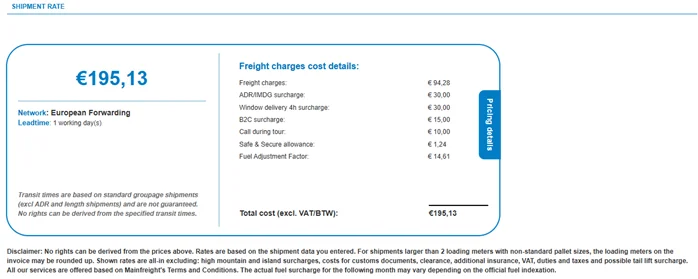
2. DGD documents are now required for overseas destinations
The document upload section, same as in place for custom countries, will now also be activated once you book a shipment that goes overseas and contains ADR (dangerous goods). This has been created to be made more aware of the documents that are required to transport ADR goods overseas and what the risks are if they are not uploaded/send to Mainfreight on time.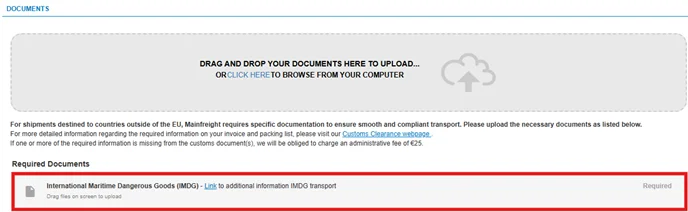
3. Booking environment update icons on home page and new Track and Trace button
On the home page of the booking portal, the icons to the different features have been updated. The icons are now more inline with what the feature does. The ‘’Create Shipment from Template’’ option has been removed seeing and has now been replaced with a Track and Trace option. This new option will link back to the home page of Mainchain.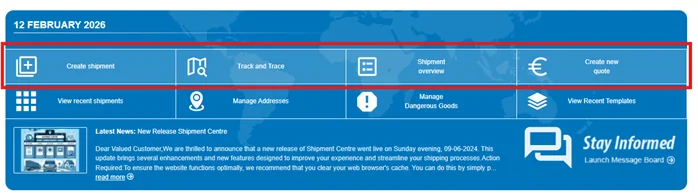
4. N.O.S information option added to the ADR template/popup
To inform you better on what the N.O.S details are of ADR goods, an information feature has been added. This to provide some details on what N.O.S is and where you can find more information about it.This new option will only work once you have received a order conformation for that specific shipment.

5. More clear indication for if Customs related accessorials are not selected
Mainfreight was made aware that it was found unclear which mandatory customs accessorials must selected. A more clear visual will has been added: if a required accessorial in a customs group is not selected, a red exclamation mark will be shown. Once the accessorial is selected, the red exclamation mark disappears.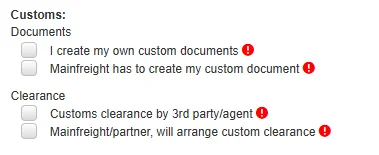
More Information?
Go directly to the pages to view more

Contact
Do you need more infomation? Contact your local branch .

FAQ
Questions about our Shipment Centre? View our FAQ page here.
Upload via .csv file
View the manual and upload you shipments quick and easy via .csv file.

Shipment Centre
Enter, manage, change and check your shipments in a simple and orderly manner..